Why Digital Art Doesn't Replace Mindful Art (And Why I Do Both)
I love the act of putting pen to paper. Always have, always will.
Whether that’s been in the context of drawing or handwriting, it’s an activity I’ve always enjoyed. If you were to tot up the number of notebooks I’ve owned over the years, you would see I am a traditionalist.
That said, I have fallen down a rabbit hole in the last couple of years of creating digital art.
The more that I’ve balanced my traditional art (mainly The Zentangle® Method) with digital apps such as Procreate and Affinity Designer, the more I’ve become aware of the differing opinions out there on each medium.
Some people believe that traditional art is best as it’s authentic and real. However, there are others out there who really see the value in a painting created using tools beyond paintbrushes and paper.
As someone who creates art both traditionally and digitally, I am well placed to see the benefits and downsides of each kind of art. Keep reading to find out why digital won’t replace mindful art, and why I do both.
Why Zentangle works for me
Zentangle’s screen-free aspect is just one of the many reasons that I find myself drawn – no pun intended – to the method.
Could I practise mindful drawing on my iPad? To some extent, yes.
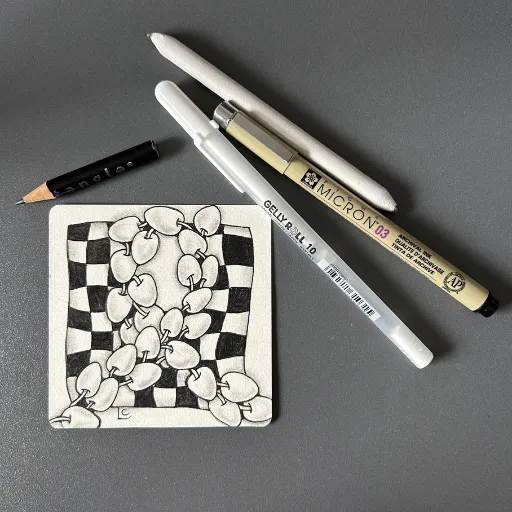
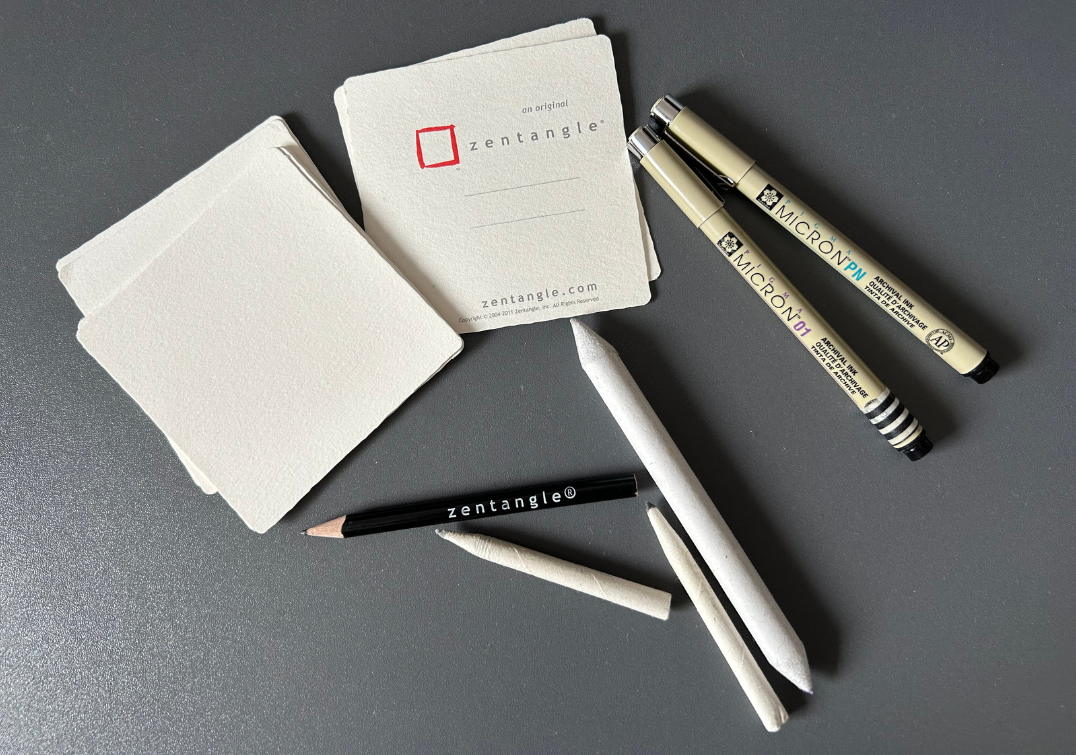
For me, though, Zentangle comes into its own due to what the founders refer to as the ‘elegance of limits’. While you could easily use a large variety of tools to create Zentangle-inspired art, Zentangle beginners and traditionalists use a white three-and-a-half-inch square tile, a black fineliner pen, a simple graphite pencil and a blending stump. That’s it.
Compare that to using an app like Procreate to create something, whether lettering, calligraphy or art of some kind. What size of surface should you pick? Once you’ve created your canvas, what brush should you use? Even before you contemplate the massive selection of brushes for sale on the likes of Etsy, Procreate comes pre-loaded with so many more brushes than you could ever need. It’s honestly quite overwhelming. The same can be said for your choice of colours, with literally every colour you could imagine available in-app. That all just creates a whole load of decision fatigue.
Then, when it comes to Affinity Designer, you find yourself facing a steep learning curve before you’ve even got to the fun stuff.
I’m not intending to be critical of either app as I genuinely love them, but it’s just that there is more of a barrier to getting started with being on screen than there is when simply putting pen to paper.
Zentangle’s ‘elegance of limits’ isn’t actually a restriction, it’s just a way of making it much easier for someone to sit down and create without their brain spiralling into decision fatigue before they’ve even started.
No mistakes on paper, undo on screen
I mainly use my iPad to create seamless patterns and associated clip art. I’m not going to lie: when I’m using Procreate I am not nearly so mindful of the no-mistakes philosophy that Zentangle advocates, which means no erasing or starting again.
If you follow the Zentangle Method faithfully, you work with a mark you didn’t intend to make, using it as a chance to take your art somewhere unexpected and to see it as an opportunity rather than a failing. You can read more about Zentangle terminology in this blog post.
I’ve witnessed students in my classes visibly relaxing as they allow themselves to stop worrying about getting it right and just enjoy the process.
To my mind at least, that whole unplugged feel just can’t be transferred to a screen.
If I think my line art looks a little too wobbly or jaggy, I will use the undo button. And again. And again!
There are some traditional art styles that I dabble in, such as watercolour, and I find myself going against the principles of the Zentangle Method here. I do give myself a hard time sometimes, I have to admit. With The Zentangle® Method, I feel completely confident in my abilities. I’m not so experienced with watercolour and find the no-mistakes philosophy from Zentangle hard to apply to this other art form.
What digital does best
When you’re creating an electronic watercolour painting, though, it’s freeing to not worry about whether your colours will blend well or not, or whether you’ll ruin all the hard work you’ve done up to that point.
There’s also no having to prep your art and clean up afterwards: you can put that Apple Pencil down and not have to worry about rinsing out brushes.
You can also duplicate your artwork, which is clearly a HUGE time saver. Instead of having to draw the same things multiple times to create traditionally hand-drawn assets, your iPad allows you to duplicate that asset in literally a second. As someone who has a creative business, that is massive and it’s just one example of the many benefits of modern technology. I can, and have, digitised art drawn on paper to duplicate it in an app, but that is still more time-consuming than completing the whole process in an app.
Digital art isn't AI art
One possible negative aspect of that ability to undo your art so easily is that it can result in your work being perceived as AI-generated.
Recently, I showed my husband, Bob, a duck-themed pattern I created. He said it was “lovely, but a bit AI”. When I played him back the video that Procreate saves as you create each project, he was then really impressed to see the replay of me adding different colours and drawing my line work etc.
I think Bob’s comment shows where we’ve got to in terms of AI taking over these days – it can make us sceptical if something’s actually hand-drawn or not. The lines have become a bit blurred.
I do want to be completely honest here and say that sometimes I use ChatGPT to create a reference image for me that I can either trace over or copy. The reference image is created specifically for me rather than copied from another artist’s work. I often tweak that image myself as well to get it closer to what I want. Sometimes it’s helpful just to have more of a starting point. Occasionally I download royalty-free images from sites like Unsplash and Pexels. From there I might trace the outlines of the image or keep the image at the side of my screen as a reference and freehand the drawing.
What matters to me is that whether I use a ChatGPT image or a photo, I always make my finished art completely different, changing up the line work with a different style of brush, and using a completely different colour palette.
How paper and iPad feed each other
Something that I find really cool about having access to traditional and digital methods is how they can feed into each other rather than compete with one another.
I’ve previously taken a tangle I’ve drawn on paper, just for the pleasure of it, and it’s ended up as an asset in one of my digital patterns.
Working on paper helps me to get my ideas started and the iPad gives me the ability to easily create a full collection of patterns. Neither could replace the other. They’re doing different jobs.
Why I do both
If you’re unsure of what you think about modern technology being used to create art, have an open mind. Traditional methods aren’t going anywhere. Digital apps can just streamline and speed up the process of creating a finished product.
Sometimes you might find yourself using a fineliner to draw on a blank tile, away from other distractions. Other days you’ll be working on an iPad with your unlimited use of the undo button. Both are valid and both have their place in the art world.
Pen to paper will always be my favourite way of being creative, but it’s good to know that I have the option of the iPad as well. Whichever one I pick up, the aim is the same: a bit of quiet, creative time that helps me switch off.
If you’d like to try the traditional side for yourself, you can download my free eBook, The Art of Calm, which takes you through an entire Zentangle project, or have a look at my Introduction to The Zentangle® Method online course.


